TravelDesk corporate portal
Try TravelDesk
New
TravelDesk

Corporate travel,
managed end to end.

TravelDesk gives corporate clients a branded self-service portal: policy enforcement, multi-level approvals, real-time spend reporting, and global flight and hotel content, all in one place.

Book a walkthrough See the feature map
TravelDesk features

Everything your corporate clients need in one portal.

Built for travel management companies and agencies that serve corporate accounts. Configure once per client, then let travellers self-serve.

Enterprise
Enterprise SSO

Connect to any corporate identity provider via SAML 2.0 or OIDC. No separate passwords, no duplicate traveller records.

Most used
Approvals and workflow

Build multi-level approval chains by department, trip value, or destination. Managers receive email prompts and approve in one click.

Policy control
Travel policies

Set cabin class by grade, advance purchase windows, preferred carriers, and budget caps. Out-of-policy bookings flag automatically for approval.

Live data
Reporting and analytics

Live dashboards show spend by department, carrier, and route. Export to CSV or connect to your BI tool. Scheduled reports delivered by email.

NDC ready
Global flight content

Live fares from GDS, NDC, and LCC sources in one search. Corporate negotiated rates load automatically when the traveller signs in.

Popular
Hotels and transfers

Load preferred hotel chains and corporate rates. Add airport transfers at checkout. One itinerary, one invoice.

Policy control

Set the rules once. The platform enforces them every time.

Define cabin class entitlements by seniority grade, advance purchase requirements, and per-trip budget limits. Bookings that fall outside policy are flagged automatically and routed for manager approval before ticketing.

  • Multi-level approval chains by department or trip value
  • Email notifications with one-click approve or reject
  • Full audit trail: every decision timestamped and logged
traveldesk.yourcompany.com / policies
Approval queue · 3 pending
JS
James S. · LHR → SFO · Business
$4,820 · Out-of-policy: advance purchase
Needs approval
PK
Priya K. · DXB → BKK · Economy
$880 · In policy
Auto-approved
✓ Confirmed
Policy compliance
87%
▲ +4% vs last month
Pending approvals
3
Avg. response 2.4 hrs
traveldesk.yourcompany.com / analytics
TravelDesk Acme Corp Overview Analytics Approvals Travellers Sarah M. Spend Analytics Jan – Jun 2025 ▾ Export CSV BI Connect TOTAL SPEND $284,750 ▼ $12,300 under budget NEGOTIATED SAVINGS $41,200 ▲ +8% vs prior period TRIPS BOOKED 847 Avg. 14 days advance POLICY COMPLIANCE 87% ▲ +4% vs last month Monthly Spend Flights Hotels $80k $60k $40k $20k Jan Feb Mar Apr May Jun By Department Sales 34% Ops 25% Tech 20% Other 21% Top Routes LHR → DXB $48,200 LHR → SIN $36,750 DXB → JFK $29,100 LHR → CDG $18,400 Recent Bookings TRAVELLER ROUTE DATE COST DEPT STATUS James S. LHR → SFO · Business 12 Jun $4,820 Sales Needs approval Priya K. DXB → BKK · Economy 10 Jun $880 Ops Confirmed Marcus T. LHR → CDG · Economy 8 Jun $340 Tech Confirmed
Spend analytics

See exactly where your corporate travel budget is going.

Real-time dashboards break down spend by department, cost centre, carrier, and route. Compare actuals against budget with a single view for finance and travel managers alike.

+18%
Spend visibility vs. prior year
87%
Avg. policy compliance rate
14 days
Average advance booking lead time
CSV / BI
Export or connect to any BI tool
Traveller experience

A consumer-grade booking flow, inside your clients' brand.

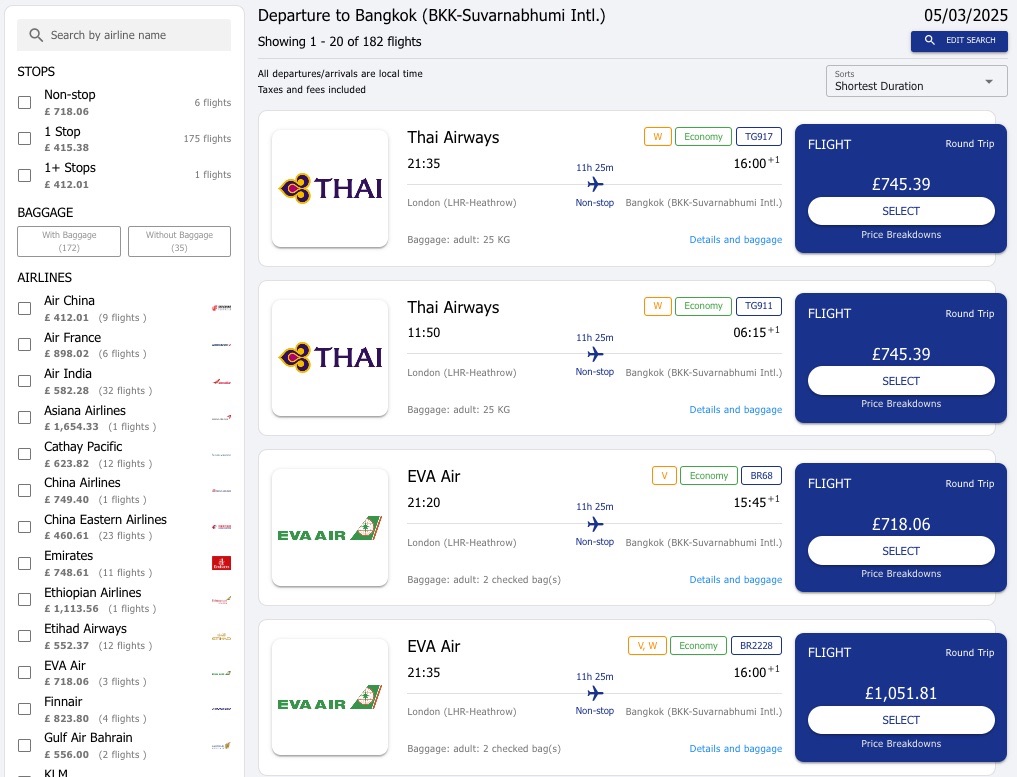
TravelDesk is fully white-labelled. Each corporate account logs in to a portal branded with their own logo and colour scheme. Travellers search and book in the same way they would on any consumer site, but policy guardrails and preferred content are applied behind the scenes.

  • Branded portal per corporate client, no shared logins
  • Negotiated fares and preferred hotels surfaced automatically
  • Mobile-ready: book from desktop, tablet, or phone
traveldesk.yourcompany.com / book
Traveller self-service booking interface
Getting started

Live in weeks, not months.

No custom development required. Connect your identity provider, configure policies per client, and go live.

1
Connect your identity provider

Point TravelDesk at your SAML or OIDC endpoint. Traveller profiles sync automatically on first login. No CSV uploads, no manual user management.

2
Configure policies per client

Set cabin class rules, advance purchase windows, preferred carriers and hotels, and approval chains through the admin panel. Each corporate account gets its own isolated configuration.

3
Go live and grow

Onboard your first corporate account and start capturing bookings directly. Add new accounts, adjust policies, and expand to hotels and transfers as you grow.

Common questions

Answers before you ask.

How quickly can we launch a corporate travel desk?

Most clients go live in weeks. That includes a branded self-booking portal, policy and approval rules, supplier connections and team training.

Can we keep our existing GDS and suppliers?

Yes. altovo layers on top of your current setup and connects major GDS, NDC and low-cost content, so you add capability without replacing what already works.

Are there per-booking or per-seat fees?

No per-booking fees and no per-agent licence fees. You pay one flat licence, so costs stay predictable as you scale.

Who owns our travellers' data?

You do. Your data stays in your environment and is never sold or shared. altovo is certified to PCI-DSS Level 1 and SOC 2 Type 2, with GDPR built in.

Ready to launch TravelDesk for your corporate clients?

Let's walk through your first client setup and show you how fast you can go live.

Book a walkthrough